
What has Changed?
As of Thursday 28 November 2024 Employee Profiles will now include a setting to mark individual employees as Tracked or Untracked by Default. This new feature provides organisations with the ability to hide employees who do not track time in Tātou from Reporting and Payroll.
How do I use it?
The item is now located in an Employee’s Employment Period, and can be updated either by:
-
Editing Individual Employment Periods
-
Tātou Office App’s Bulk Edit Employee Feature
-
Tātou Office App’s Bulk Import Feature
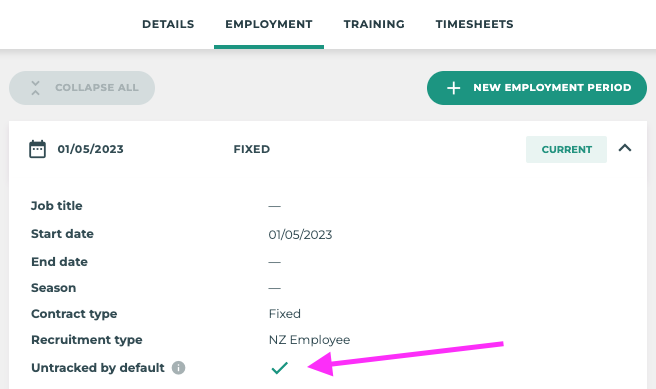
Untracked by default 

This Employee will appear in all Tracking and Pay Periods regardless of whether they have time tracked in
Untracked by default 
This Employee will NOT appear in Tracking and Pay Periods, unless they have time tracked in Tātou
Updating Untracked by default settings:
Organisations can then decide who should not be tracked and edit employee profiles by updating this setting using:
-
Individual Employee Profile Changes
-
People → Employees → Employee Profile → Employment → Employee Details → Untracked by default
-
-
Employee Bulk Edit Feature
-
Select Employee(s)
-
Bulk Edit
-
RELACE Untracked by Default
-
-
Employee Bulk Import Feature
-
Run Employee Export
-
Edit value in
untracked_by_default(column AT)-
FALSE =
-
TRUE =
-
-
After the release we recommend making any required changes before the next pay period is created to avoid confusion and make the most out of this new feature. Changes that may be required include:
-
Ensure ACTIVE employees are up to date, and any employees who have left for the season, or left all together are marked as INACTIVE.
-
Update Employee Profiles for any users who do not regularly track time in Tātou (e.g. Admin Staff, Managers, etc.), and mark them as Untracked by default →