What has changed?
This release packed in several changes designed to improve features related to Tātou Office App user experience including: added bulk edit options for employee updates, division visibility across the platform, as well as a few features to improve the Job editing experience based on customer feedback.
Employment Period Features:
-
Employment Period Status is now available as a column option on the Employees Page table
-
Bulk Edit Updates including:
-
ADD NEW Employment Period End Date
-
REPLACE EXISTING Untracked by Default
-
Division Visibility:
-
Division and Restricted to Division values available as column options in tables throughout the app
Editing Jobs:
-
Changing a Job’s Task will now update default sales rate if there is one one for the Task
-
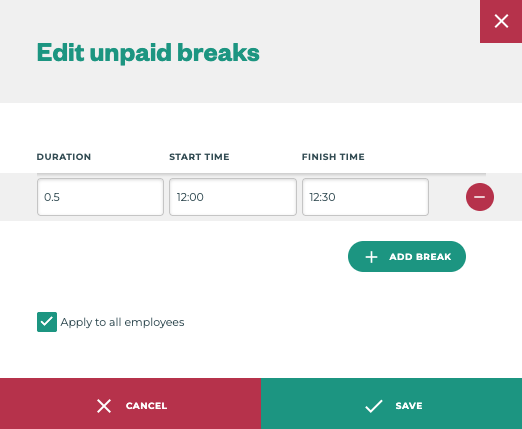
Advanced Breaks can now be copied to all timesheets in the even that one or more employees on a job were missed or had incomplete timesheets.
-
Editing Expenses can now occur even after the pay period is closed
These changes improve Tātou Office App usage, and were direct requests made by our customers.
How do I use it?
Bulk Edit Employment Period Information
This works the same as previous bulk edits. Simply select one or more employees from the table, and click Bulk Edit.
Editing columns displayed (division and employment period status updates)
-
On most tables in Tātou Office App you’ll find a small icon →

-
Click the icon to open a popup window where you can customise the columns visible
Some tables have more columns available than fit nicely on the screen - turning on all columns on these tables may impact your user experience.
Editing a Job’s Task Updates Default Sales Rate to New Task’s Default
Editing the task is no different, however some users may have developed internal processes to ensure these changes were caught when invoicing. Discuss with your team how this change may impact, and hopefully reduce, external processes related to invoicing.
Copy to All - Advanced Breaks
This change only applies to users who have the advanced breaks feature enabled. On Jobs where multiple employees are tracked, users can now copy advanced breaks to all timesheets by selecting the “Apply to all employees” tick box on the advanced break pop-up window.