
What has changed?
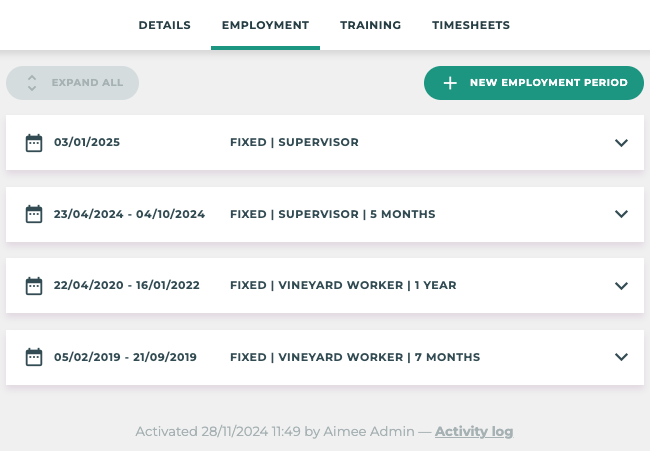
Tātou Office App has expanded upon Employment Period Data with this release which improves the system’s ability to maintain and display historical employment information for both seasonal and permanent employees. For more information on Employment Periods click here.
These changes impact our RESTful API - please see notes below if you have built your own API connections.
How do I use it?
Employment Period Information is now combined into specific Employment Period Sections which have unique start and end dates. This is particularly useful for seasonal workers who return year after year, but can also be used for permanent staff who have changed jobs during their employment.
Every Employee MUST have at least 1 employment period
When Creating a NEW EMPLOYEE?
An employment period will be created automatically when new employees are added. All details can be edited during the employment period.
When Changing Employee Status to INACTIVE?
Add an Employment Period End Date, to close the Employment Period and lock the information from edits. This helps maintain accurate historical information.
When Changing RETURNEE Employee(s) Status to ACTIVE?
If you have not already started using Employment Periods, some Returnee staff may not have had their previous Employment Period closed with an END DATE. To get the most out of this feature, check that Employees who are returning do not have a current Employment Period.
Activating Employees with no current Employment Period will automatically add a new one. Make sure the Start Date is accurate to when they actually started if they are added after the fact.
If an employee has timesheets tracked before their Employment Period Start date your pay periods will not close. Pay Period "Calculation Failed" this article will help you resolve this issue.
RESTful API changes:
We will support the current structure and the new structure to allow time for you to update your integrations.
The fields affected are:
-
agreed_hours
-
Removed; use agreed_hours_min
-
-
Moved into nested current_employment_period object
-
job_title
-
season
-
contract_type
-
recruitment_type
-
agreed_hours
-
agreed_hours_min
-
agreed_hours_max
-
topup_to_agreed_hours
-
topup_to_agreed_hours_costing_code
-
next_hourly_rate
-
These fields will be marked as deprecated as of this Thursday (January 16), and removed no earlier than
If you interact with any of these fields, please plan ahead before the fields are removed to avoid interruption. In most cases this will just require nesting of the relevant fields. As always, please reach out if you have any questions. And remember you can dig into the API docs any time here (these too will be updated on Thursday).