
This release adds scheduling and reporting power with features improving. Introducing Scheduled Reports!
What’s Changed?
Tātou Office | Scheduled Reports
Running reports is a regular occurrence for our users - many of which are pulled on at the same time each week. To help automate this process the team have designed a tool to Schedule Reports that are run on a specific schedule. By scheduling reports users can define filters and run reports on a set schedule, hopefully reclaiming a bit of admin time from creating and waiting for downloads.
Dashboard | Weekly overtime forecast Widget
Formerly the “Weekly overtime” widget - we’ve updated this widget and calculations related to reporting of overtime information based on your feedback. This includes:
-
Addition of a Total Hours Remaining Column
-
Calculation of Average Hours/Week Remaining using Decimal Weeks. This update means that the information presented is as up to date as the work tracked in Tātou, so as and when workloads change, users have the information they need to plan accordingly.
Dashboard | Performance Rate Type Reporting
Organisations using Performance Bonus will see an upgrade in the reporting capabilities of the Productivity and Performance Dashboards. Previously employees who did not earn a performance bonus had their hourly rates reported as their base hourly rate on these dashboards. With this update, these dashboards now expose the unit based earned hourly rate which provides a clearer picture of employee productivity, giving managers the insight they need to assess unit rates and support crews.
All Jobs | New Columns & Icons
Units per Job and Scheduled Task Link Icons have been added as optional columns to the All Jobs table.

Field App | Scheduled Task Dates
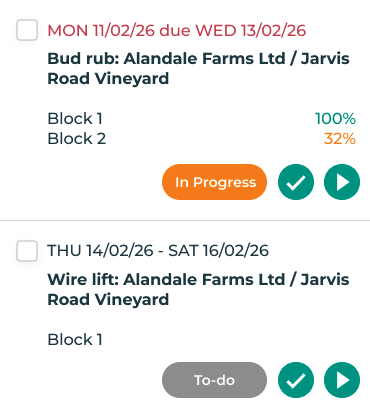
Scheduled Tasks previously displayed only the due date on the Field App. To provide a bit more context to users in the field the start date has been added.
This is particularly helpful for tasks that may not have defined units worked.
Download the latest version of Tātou Field App - availability may vary depending on device. Enabling auto-update feature on your device ensures updates are downloaded as soon as they are available.
How do I use it?
Employee Performance Dashboard