
Many of our users are pulling the same report at the same time each week as part of their normal data checks and payroll processes. Tātou’s new Scheduled Reports feature is designed to automate the process of running regularly scheduled reports - spreading the data load and giving users some time back in their day to work through more important things.
How does it work?
-
📝 Create up to 5 Scheduled Reports from the Reporting > ‘Scheduled’ Tab.
-
📩 At the date and time set by the user who created it, Scheduled Reports will be emailed to the user’s email listed on their Employee Profile > Details > Username and Password.
-
📎 Files will be attached to the email and available in the Office app ‘Reporting > Archive’
Payroll Data Type reports will run data as is at the time of scheduling. These will not recalculate open payroll data as part of the automation.
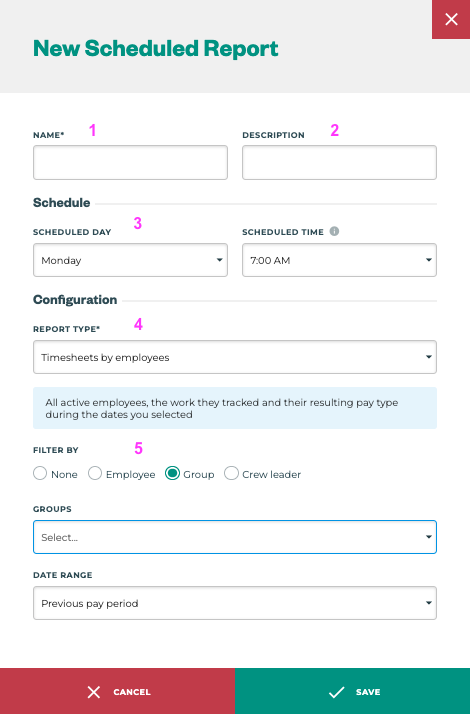
Scheduled Report Settings
|
Scheduled Report Field |
Notes |
|
|---|---|---|
|
Can be used to differentiate scheduled reports that may use the same report type (4), but have different filters, or even the name of the user who the report is for. |
|
|
Free field |
|
|
Date and Time the report should run |
|
|
Reports available are based on permissions and division settings. All report types are available to schedule; Custom Reports, Standard Reports or Legacy Reports. |
|
|
Set Date Range Filters (last week, last pay period, current pay period), with the standard filter options available depending on the report type and division settings. |
Have Feedback?
If you have any feedback after giving it a go send your thoughts through to support@tatou.app