
If your Organisation uses Default Rates and Invoicing Rates for your Tasks that change seasonally, using the Task Bulk Import is a quick way to update these rates.
Task Rates do not have a “Next Rate Effective Date,” so this method is best reserved for those pre-season updates, prior to tasks starting.
1. Getting Started
Users should start by downloading the Task Codes Export.
Pro Tip: Save a copy of the Task Code Export prior to any updates. This provides a single source of Historical Task Rates for your Records.
Tātou Terminology Review:
hourly_rate: this is the hourly rate intended for employee with hourly timesheets
(note: this rate is only applied to hourly timesheets, it is not used as a minimum value to top up to on contract work jobs)
unit_rate: this is the unit rate intended for employees with contract rate timesheets
invoicing_hourly_rate: the default invoicing rate applied to hourly timesheet hours
(note: this will contribute to the Job Revenue value in the Job Costing Summary)
invoicing_unit_rate: the default invoicing rate applied to units completed on a Job
2. Bulk Updating Task Rates
-
Locate the Tasks that require updated rates
-
Edit values in the rates columns
-
Save a copy of the Updated Rates File
3. Import the Updates
-
Admin Menu → Tasks
-
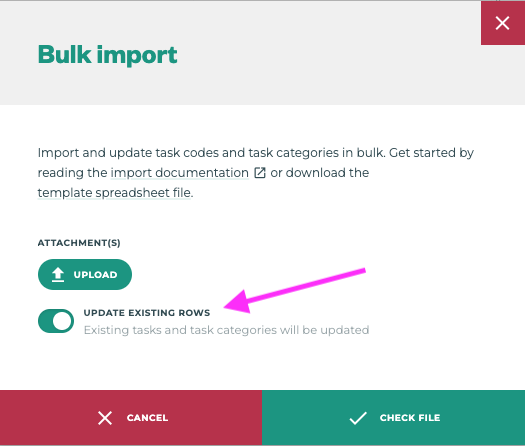
Click the Import Button and then the Upload button to attach your file
-
Click the Toggle below the Upload button to Update Existing Rows
4. Reload data in the Field App
-
Have Tātou Field App Users RELOAD DATA before the Tasks begin in order for them to see the updated tasks rates in the Field App